The water break is too late
You usually find out a player slept four hours the same way I did: at the water break, after they've looked flat for twenty minutes. Kids don't volunteer this stuff. And asking fifteen of them one at a time is tedius and eats the whole warmup.
Super Trainer now does the asking for you. The feature is called the wellness check-in, and the entire thing runs on a link.
How it works
Pick your players in the app and hit send, or turn on auto-send and the app handles it on practice days at the hour you choose. Each player has a contact on file, usually a parent. That contact gets an email with a link.
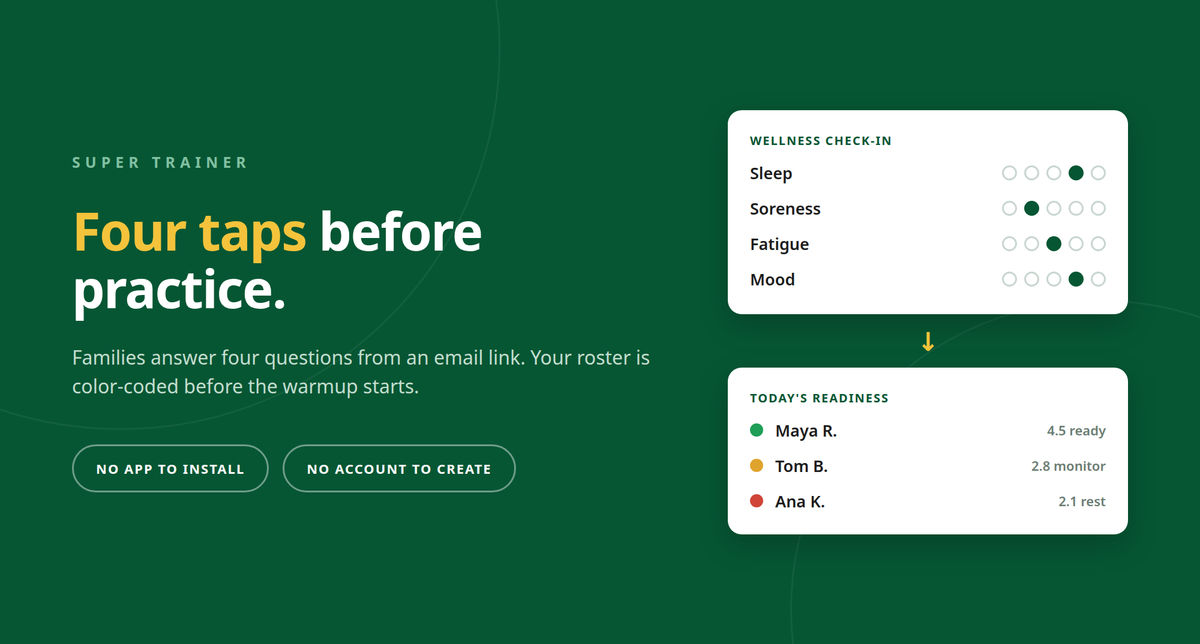
The link opens a plain web page with four questions: sleep, soreness, energy, mood. Each answer is one tap on a 1 to 5 scale, and there's a note box underneath if they want to add something. About twenty seconds, start to finish.
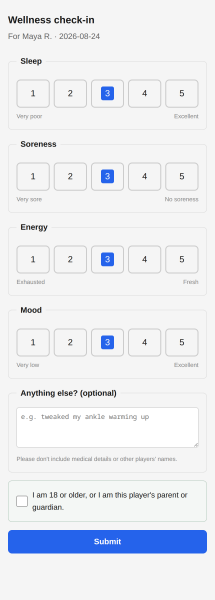
There's no app for the family to install and no account to create. It works on whatever phone opens the email, and nobody has to remember a password.
What you see before practice
Open the Health page and the roster is already colored in. The app averages the four answers into a readiness score out of 5. At 3.5 and up the player shows green, 2.5 to 3.4 is amber, anything under 2.5 is red.
You can also see who hasn't answered yet, which is sometimes the most useful info of the lot. A family that hasn't replied in a week is worth a text either way.
The check-ins sit next to the workload numbers the app already tracks. Session RPE feeds an acute-to-chronic workload ratio. It weighs this week's training load against the four-week baseline, following Gabbett's 2016 training-load research, and 0.8 to 1.3 is the zone you are aiming for.
Put the two together and you have something to act on before the first whistle. A player who reports sore and shows up red-zoned on the same morning is not the player to push through a heavy fitness and cardio challenge. Move them to the technical group or cut their reps. Amber on two players is a normal Tuesday. Amber on six means Monday's session was heavier than you thought, and the fix belongs in your plan rather than in a conversation with the players.
None of this tells you a player is injured. It tells you where to look, and it does it before practice instead of after.
What families agree to first
A parent has to say yes before anything goes out.
The first time you hit send for a new player, their parent gets the email instead. It says what the app collects and how long it's kept, with a button to agree. A confirmation follows, and only then do the check-ins start. A page under your club shows who has agreed and who you're still waiting on.
Each of those emails has a link that stops everything in one click, and using empowers the parent to stop using it if they change their mind.
Wellness check-ins are part of the paid sync subscription, since the answers go through a server before your tablet sees them. Everything else about the app is still offline-first and account-free, same as always.
If you try it with your team, tell me how the families take to it. The feedback button sends straight to me, and I read every submission.
---
*Super Trainer is an offline-first practice planner for coaches, built by MNK Solutions. Plan sessions, run drills, and track player wellness. It works offline and doesn't ask you to sign up. Android on Google Play, iOS on TestFlight with the App Store to come.*